Flaky Tests Dashboard
This page describes the Flaky Tests tab of a repository and how BuildPulse decides that a test is flaky.
Background
BuildPulse flags a test as flaky in two ways:
Same code, different result: every upload records the git tree SHA of the commit that was tested. When a test fails and BuildPulse already has a passing result for that test on the same tree SHA, the test is flaky: the code did not change and the outcome did. No thresholds apply. Each failing result caught this way is one disruption. In the app this is labelled Same-commit conflict.
Failure rate: for each test in an upload, BuildPulse looks at that test's results over the last 30 days. The test is flagged when its failure rate is at or above the Flaky Detection Threshold (default 3%), it has at least Minimum Test Runs (default 10), and its failures are on at least Minimum Branch Count distinct branches (default 2). In the app this is labelled Failure-rate pattern.
A test can also be flagged by hand. The settings are per repository, on the Flaky Tests tab under Settings ("Flaky Test Settings"). See Test Quarantining. The full rules are in How flaky tests are detected and quarantined.
Overview
At the top of the Flaky Tests tab are four numbers: Active, Quarantined, Total Detected and Total Disruptions, followed by a Flaky Test Activity chart.
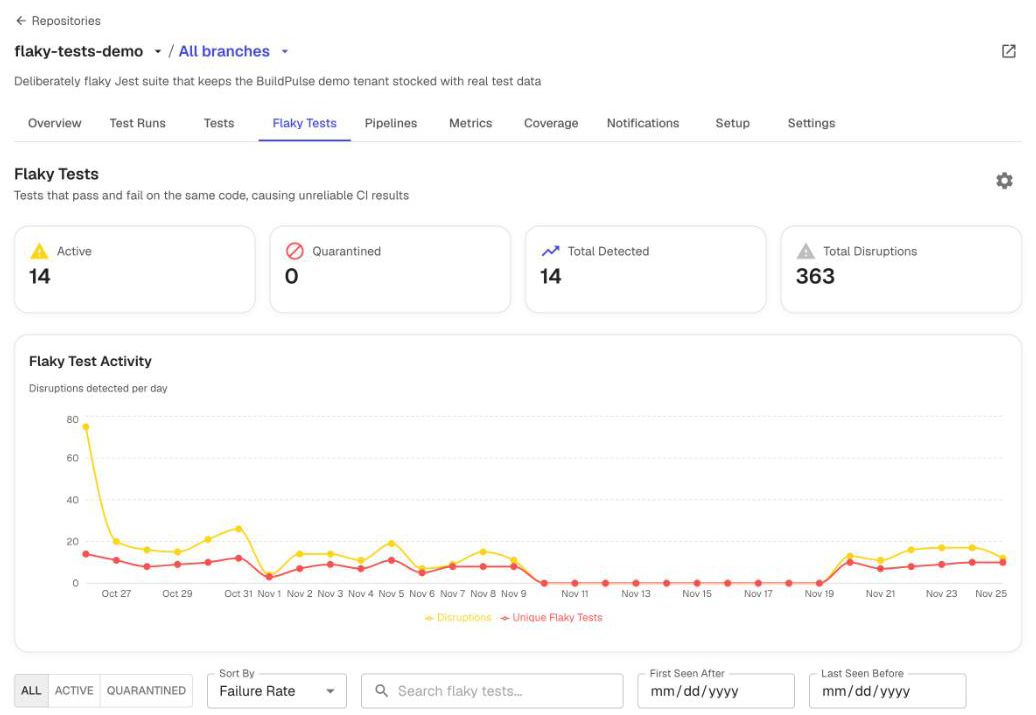
Flaky Tests Table
| Column | Description |
|---|---|
| Test Name | The flaky test. Click it to open the test's page. |
| Disruptions | Failing results that were caught as "same code, different result". |
| Failure Rate | The test's 30-day failure rate, saved when failure-rate detection last flagged it. A test caught only by same-code detection shows 0%. |
| Time Consumed | CI time attributed to the flaky test. |
| First Seen | When the test was first flagged. |
| Last Seen | When it was last seen flaking. |
| Status | Active or Quarantined. |
Filtering and Sorting
- All / Active / Quarantined: show every flaky test, only those not quarantined, or only quarantined ones.
- Search flaky tests...: search by test name.
- Tags: shown when the repository has tags. Selecting several tags matches tests with any of them.
- First Seen After and Last Seen Before: limit the list by date.
- Sort By: Failure Rate (the default), Most Recent, Disruption Count, or First Seen.
Quarantining from the list
Tick the tests you want and click Quarantine selected. To release tests, use Resolve on a test's page, or Bulk Resolve Quarantined Tests on the repository's Settings tab.
A flaky test's page
A flaky test's page shows how it was detected, its history, and its Quarantine History. The actions are View Build, Quarantine or Resolve, Create Issue (a GitHub issue), Create Jira Issue (when the repository is linked to a Jira project), and a link button to attach an existing issue URL. See Project Management Integration.